
Precautions for using Paihao Technology's 4K and 3D projectors
Paihao Technology Co., Ltd. focuses on multimedia devices and other fields, and its 4K and 3D projectors have attracted attention for their excellent performance. In order to enable users to fully utilize the advantages of the device, ensure the user experience and device lifespan, the following key points should be noted during use.
Installation and placement
Stable Placement: Paihao 4K and 3D projectors require high stability for placement, and must be placed on a stable, sturdy, and earthquake resistant surface, such as a dedicated projection bracket or a thick solid wood tabletop. Avoid placing it on carts that are prone to shaking, tables that are frequently moved and unstable, or environments that may generate vibrations due to the operation of surrounding equipment. Unstable placement can cause continuous shaking of the projected image, seriously interfering with viewing, and even potentially causing the projector to fall and be damaged due to accidental shaking, resulting in unnecessary losses.
Stay away from liquid areas: It is strictly prohibited to place any containers containing liquids around the projector, such as common vases, water bottles, humidifiers, etc. The internal structure of the Paihao projector is precise and the electronic components are dense. Once liquid accidentally spills in, it can quickly cause a short circuit fault, resulting in the burning of core electronic components. This damage is often difficult to repair and directly affects the normal use of the equipment.
Ensure good ventilation: Projectors generate a large amount of heat during operation, and this product from Paihao is no exception. The specially designed ventilation slots and openings on the hood are key channels for ensuring heat dissipation and must not be blocked during use. Do not place it on the surface of soft objects such as sofas or cushions that are prone to clogging air vents, and do not place it in enclosed and narrow cabinets with poor air circulation. It is recommended to reserve at least 10-15 centimeters of space around the projector to ensure free circulation of air, timely removal of heat generated by the equipment, and maintenance of stable operating temperature.
Avoid obstruction and interference: During the operation of the projector, objects should not be placed near the ventilation opening to prevent obstruction of hot air discharge and cold air entry, which may cause the equipment to overheat and reduce frequency, affecting performance. At the same time, it is necessary to ensure that there are no obstacles in front of the projection lens, whether it is temporarily placed objects or long-term obstructions, which will damage the integrity and clarity of the projection image, and cannot display the delicate texture of 4K high-definition images.
Power usage
Matching the correct power supply: Paihao 4K and 3D projectors have strict requirements for power compatibility, and must be selected based on the power type clearly marked on the projector housing. If users have any questions about the power specifications, they should consult with Paihao Technology dealers or contact local professional electrical companies as soon as possible. Using mismatched power sources, such as voltage and current parameters that do not match, can easily damage the internal power module and other sensitive electronic components of the projector, and may even cause safety accidents due to overload.
Standardized plug insertion and removal: This projector is equipped with a grounded three pin plug, which needs to be plugged into a properly grounded socket to ensure electrical safety during use. If using a two pin socket, it must be replaced with a three pin socket by a professional electrician. When plugging or unplugging, be sure to keep your hands dry and avoid operating with wet hands to prevent the risk of electric shock. At the same time, it is necessary to avoid inserting the plug into a dusty socket. When inserting, ensure that the plug is tightly attached to the socket to prevent electrical sparks caused by poor contact and potential fire hazards.
Prevent power overload: Do not overload the power socket and avoid connecting multiple high-power devices, such as air conditioners, electric heaters, and projectors, to the same socket at the same time. Running multiple high-power devices simultaneously can cause excessive current in the wiring or sockets, which may lead to overheating and fire of the wires, or cause electrical leakage accidents. Equipping a separate socket for the Paihao projector is a reliable practice to ensure electrical safety and stable operation.
Protect power cord: Do not place the projector in a location where the power cord is easily stepped on, and also avoid the power cord from being squeezed by heavy objects or frequently bent. Long term external forces can wear down the insulation layer of the power cord, exposing the internal wires and posing a risk of short circuit or leakage. Once signs of damage or aging are found on the power cord, such as cracking of the outer skin or discoloration of the insulation layer, the projector should be immediately stopped and replaced with a brand new power cord in a timely manner.
Correct shutdown process: After turning off the Paihao projector, do not immediately cut off the power. The internal heat dissipation mechanism is designed such that the cooling fan will continue to operate for a period of time after shutdown, helping the light bulb and internal components to dissipate heat fully. At this time, the power indicator light is usually in a red constant light state. Users need to patiently wait for 2-3 minutes until the cooling fan stops running and the power indicator light goes out, and then unplug the power cord. Cutting off the power too early can cause heat accumulation inside the projector, shorten the lifespan of the light bulb, and in severe cases, even damage the core components of the equipment.
Daily use
Reduce frequent power on/off: Frequently turning on and off Paihao 4K and 3D projectors can cause the light bulb to repeatedly withstand strong current shocks. As the core component of projectors, light bulbs are subject to frequent current surges that accelerate the aging of their internal filaments, significantly shorten their lifespan, and increase replacement costs. Therefore, if the projector needs to be used multiple times in a short period of time (such as 2-3 hours), it is recommended to keep it in standby mode to avoid frequent power on and off operations.
Prevent severe vibration: During the operation of the projector, it is strictly prohibited to move or collide with the equipment. The internal optical and electronic components of the Paihao projector are precise and compact, and strong vibrations may cause displacement of the projection core components such as lenses, chips, etc., greatly reducing the projection effect, resulting in blurry images, color deviation, and even direct damage to key components, affecting the normal use of the equipment. If you need to move the projector, you must first turn off the device power, wait for it to completely cool down, and then handle it carefully.
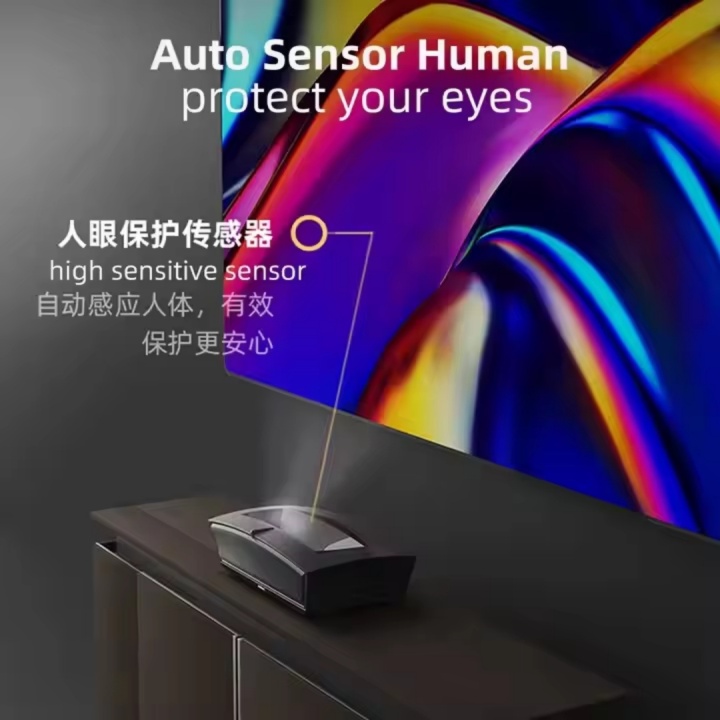
Avoid direct sunlight to the eyes: The Paihao projector has a high brightness light source, so special attention should be paid to avoiding direct sunlight to the eyes during use. Especially in demonstration or viewing scenes, it is necessary to adjust the audience's seating and the direction of the projection light reasonably to ensure that the audience does not look directly at the projection light. High brightness light shining directly on the eyes can cause damage to the retina and may have a long-term impact on visual health.
Maintain horizontal projection: Try to place the projector on a horizontal tabletop to ensure that the projected image is square and distortion free. Horizontal placement allows the projector to project light evenly, ensuring that the proportions of each part of the image are normal and presenting the best visual effect. If horizontal placement is not possible due to environmental limitations, adjustments can be made using the built-in trapezoidal correction function of the projector. However, it should be noted that excessive reliance on trapezoidal correction may sacrifice some image clarity and projection effects, resulting in blurred edges and decreased color reproduction.
Reasonable occlusion of the image: During the demonstration, if temporary occlusion of the image is required, it is recommended to use the projector's built-in "black screen" function. This function is controlled by software and can safely and effectively achieve image occlusion. Do not use a lens cover or other objects to directly cover the lens. Directly covering the lens will hinder the propagation of light, causing the internal optical system of the projector to accumulate heat, affecting the heat dissipation of the equipment. Long term use of this will shorten the service life of the equipment.
Control usage duration: Although the Paihao projector is designed to work for a long time, continuous operation for a long time will still cause the device temperature to continue to rise, affecting performance and lifespan. It is recommended to let the projector rest for 15-20 minutes every 2-3 hours to fully dissipate the internal heat of the device and maintain a stable working state. Especially when used in high-temperature environments, it is necessary to strictly control the duration of use to avoid equipment overheating and damage.
Proper use of 3D features: To use 3D features, first ensure that the 3D film source format is compatible with the projector, and the 3D glasses are also compatible with the device. When playing 3D movies, users need to wear 3D glasses correctly and adjust the parameter settings between the projector and the 3D device appropriately based on the actual viewing distance and angle. Due to the possibility of eye fatigue and discomfort caused by prolonged viewing of 3D movies, it is recommended that viewers take timely breaks and avoid prolonged continuous viewing to protect their visual health.
Maintenance
Regular cleaning and maintenance: Regularly cleaning the projector dust is the key to keeping the equipment in good operating condition. Gently wipe the projector housing with a soft dry cloth to remove surface dust and stains. The action should be gentle to avoid scratching the housing. For the lens section, as it has a significant impact on imaging quality, it is necessary to use a professional lens cleaning cloth or lens cleaning solution and gently wipe it according to the correct method to prevent scratching the surface coating of the lens and ensure clear image. At the same time, if the projector is equipped with a filter, it generally needs to be cleaned every 1-2 weeks. A vacuum cleaner can be used to remove dust from the surface of the filter, or it can be rinsed with clean water and dried before reinstalling to ensure smooth ventilation and heat dissipation.
Timely replacement of light bulbs: Pay close attention to the light bulb usage time indicated by the projector. Paihao projectors usually specify the light bulb usage life (usually 2000-4000 hours) in the product manual. When reaching or approaching the service life, the light bulb should be replaced in a timely manner. Before replacing the light bulb, be sure to turn off the projector power and wait for the bulb to cool down completely (usually for more than 30 minutes). Then strictly follow the steps in the product manual to ensure that the new bulb is installed firmly and avoid affecting the use effect and equipment safety due to improper installation.
Proper storage of equipment: If the projector is not used for a long time, it should be stored in a dry, ventilated, and dust-free environment, avoiding direct sunlight and high temperatures and humidity. High temperature can accelerate the aging of internal components in equipment, while humidity may cause circuit short circuits. When storing, it is recommended to pack the projector in the original factory specific packaging box or customized protective bag to prevent dust from entering the interior and to avoid equipment damage from collisions. In addition, the remote control battery can be removed to prevent battery leakage from corroding the internal circuit of the remote control.
Professional in-depth maintenance: Every two years or so, it is recommended to invite professional maintenance personnel from Paihao Technology to conduct a comprehensive cleaning and maintenance of the projector's interior. After prolonged use, a large amount of dust will accumulate inside the device, affecting heat dissipation and optical performance, and may even cause circuit failures and fire hazards due to dust accumulation. It is more effective to perform maintenance before the arrival of the humid season, which can prevent equipment problems caused by humid environments in advance. If any malfunctions such as inability to turn on, abnormal image, or excessive noise are found in the projector during use, do not disassemble the equipment by yourself. Instead, immediately contact professional maintenance personnel for repair to avoid more serious damage caused by self operation.
Service Hotline:+8618217912445 (WhatsAPP)
E-mail: paihaokeji@163.com
Company address:Shop No. 23, West Rhine Peninsula Garden, 188 Jianshe West Road, Xihu District, Nanchang City, Jiangxi Province,china
Nanchang Paihao Technology Co., Ltd. is a company specializing in the production and sales of 4K laser TVs and intelligent projectors. Based on the forefront of high-tech fields and relying on advanced technology from the Chinese Academy of Sciences, we are committed to providing consumers with high-performance and high-quality laser TVs and intelligent projection products. The company manages and operates according to a modern enterprise model, constantly exploring and advancing with a pragmatic and innovative spirit. At the same time, it has a new design concept, innovation and practicality, and is customer-centric and demand-oriented.